

LP-Mimic acts only after it sees the source’s transaction on chain. So a delay always exists, and some reasons below come from it: the price moved, or the source closed before the copy could open.
Find why a copy did not open
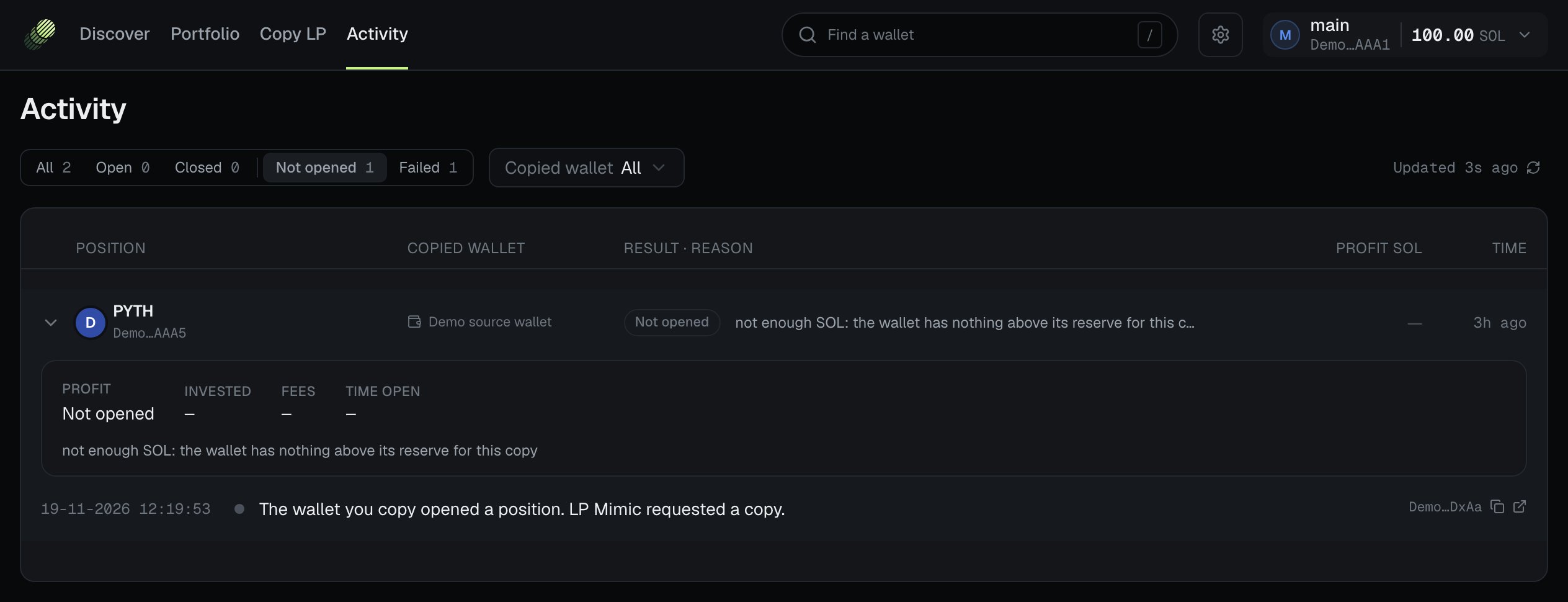
- Open Activity in the console header.
- Press Not opened or Failed at the top. All, Open and Closed show the other rows. Each tab shows its count.
- To see one wallet only, pick it in Copied wallet.
- Read the row’s Result · reason. Point at the reason to read all of it.
- Press the row to see each step of the copy.
| State | Meaning |
|---|---|
| Pending | LP-Mimic is still working on the copy. It shows only under All. |
| Not opened | LP-Mimic did not open the copy. The reason says why. |
| Failed | LP-Mimic started the copy, and a step failed. The reason says which. If no reason was recorded, the row says “stopped after it …, with no reason recorded”. |
| Open | The copy is open. |
| Closed | The copy closed. |
The steps of a copy
When you press a row, it shows the copy’s steps, newest first. Some step titles:| Step | Meaning |
|---|---|
| Did not open | A check refused the copy. |
| Bought the tokens | The copy bought the pool’s token before it deposited. |
| Skipped the token purchase | The copy did not buy the token. |
| Opened position | The copy’s position opened. |
| Resized position | The copy followed a change in the source’s size. |
| Claimed fees | The copy’s fees were claimed. |
| Closed position | The copy’s position closed. |
| Sold leftover tokens | LP-Mimic sold the token left after the close. |
| Dropped: the position closed | A part of a change was not needed any more, because the position closed first. |
Positions that need attention
If a red box says “Some positions need attention: … closed with leftover tokens unsold · … closed, final figures pending”, wait. LP-Mimic usually finishes these by itself. If the box does not clear, email support.lpmimic@gmail.com.Reasons
These are the reasons the console shows, in its own words. ”…” stands for a figure or a name. The tables follow the life of a copy: entry checks, waits, size changes, transactions and swaps, and the close and sale.Entry: money and limits
| You see | Meaning | What to do |
|---|---|---|
| not enough SOL: the wallet has nothing above its reserve for this copy | Your free SOL is not above your Wallet reserve. The same text can say “deposit”. | Deposit SOL, or lower the Wallet reserve. |
| not enough SOL: the wallet has … SOL, and fees plus the reserve need … SOL | The wallet cannot pay the fees and keep the reserve. | Deposit SOL. |
| this copy needs … SOL, but only … SOL is free to spend; this wallet is set to skip a copy it cannot take in full | The copy is larger than your free SOL, and When a copy doesn’t fit is Skip it. | Deposit SOL, or choose Open what fits. |
| this copy needs … SOL, but no SOL is free to spend; this wallet is set to skip a copy it cannot take in full | You have no SOL free to spend. | Deposit SOL. |
| this copy needs … SOL, but your limit for one copy allows … SOL; this wallet is set to skip a copy it cannot take in full | A limit for one copy is smaller than the copy. The text can also say “your share limit for one copy”. | Raise the limit, or choose Open what fits. |
| this copy needs … SOL, but …, under the smallest copy (… SOL) | A smaller copy would be under Smallest reduced copy. | Deposit SOL, or lower Smallest reduced copy. |
| this copy opened with … SOL of the … SOL it asked for, because of … | The copy opened smaller. The reason names the limit: your limit for one copy, your share limit for one copy, the SOL free to spend, or this wallet’s limit for open copies. | Nothing, if this is what you want. |
| this wallet already has … SOL open, its limit is … SOL, and this copy needs … SOL more | Max open in total is reached. The text can say “deposit” for an addition to an open copy. | Raise Max open in total, or wait for copies to close. |
| …; the room left is under the smallest copy (… SOL) | The room left under Max open in total is too small for a copy. | Raise Max open in total. |
| LP Mimic has no price for the pool’s currency, so it cannot size this copy | LP-Mimic cannot value the pool’s currency now. The text can say “deposit”. | Nothing. LP-Mimic tries again. |
| LP Mimic has no price for the pool’s currency, so it cannot apply the meme size limit | LP-Mimic cannot check the meme copy size now. | Nothing. |
| LP Mimic could not get the cost to open a position, so nothing was bought | LP-Mimic could not get the rent for a new position. | Nothing. LP-Mimic tries again. |
Entry: copying paused or stopped
| You see | Meaning | What to do |
|---|---|---|
| copying is paused: your copies are … SOL below their best point, past the … SOL loss limit | The Loss limit for all copies is reached. | Read Loss limit for all copies. |
| copying this wallet is paused: it lost … SOL, past its … SOL loss limit | The wallet reached Pause copying after a loss of. One form ends with ”; raise the limit to resume”. | Raise the limit, or press Reset the loss count. |
| copying this wallet is paused: it lost … SOL, past its loss limit | The same, without the limit’s figure. | The same. |
| copying this wallet is stopped | You turned off the wallet’s Copying switch. | Turn the switch on to copy new positions. |
| copying this wallet was stopped while the purchase body was awaited | You turned off the wallet’s Copying switch while the copy was buying its token. The copy did not open. | Nothing. Turn the switch on to copy new positions. |
| copying is off for this wallet, or set to zero percent | The wallet’s Copying switch is off, or its Copy percentage is 0. | Turn the switch on and set a Copy percentage above 0. |
| this wallet is no longer on your copy list | You archived the wallet. | Restore it on Copy LP. |
| copying is stopped for everyone by the LP Mimic team | We stopped copying for all accounts. | Wait. Check Discord for news. |
| all trading is paused, so no copy opens | All trading on your account is paused, for example when LP-Mimic’s trading permission is removed. | Check your wallet in the wallet menu. If it has the trading permission, email support.lpmimic@gmail.com. |
| LP Mimic cannot watch the copied wallets right now, so it opens no copy it could not close | LP-Mimic cannot see the sources now. It does not open a copy that it could not close. | Nothing. LP-Mimic opens new copies again when it can watch. |
Entry: timing and the source
| You see | Meaning | What to do |
|---|---|---|
| too late: the copied wallet opened this position … s ago, and copies open only within … s | The source position was too old. Its price had moved away from the source’s entry. | Nothing. You can copy the position by hand. See How a copy works. |
| this copy waited too long to open | The copy did not open in its time window. | Nothing. |
| LP Mimic could not tell how old this position is (the wallet was not checked for … s) | LP-Mimic did not check the wallet for some time, so it cannot know when the position opened. | Nothing. You can copy it by hand. |
| LP Mimic could not tell how old this position is (it started watching this wallet … s before) | The position showed in LP-Mimic’s first checks of the wallet. It can be an old position. | Nothing. LP-Mimic copies the wallet’s next new position. |
| LP Mimic has not seen this position in the copied wallet yet | LP-Mimic has no record of the position. | Wait, then try again. |
| the copied wallet already closed this position | The source closed before the copy opened. | Nothing. |
| the copied wallet closed this position before LP Mimic could copy it | The same. | Nothing. |
| … · the copied wallet closed it meanwhile | A later reason: the source closed while the copy waited. | Nothing. |
| the copied wallet’s position is empty | The source’s position holds nothing. | Nothing. |
| the copied wallet emptied this position | The source took all its liquidity out. | Nothing. |
| LP Mimic could not read the copied wallet’s position | A read of the source failed. | Nothing. LP-Mimic tries again. |
| the copied wallet’s latest transactions are not available yet; LP Mimic reads them again before it buys | The network does not serve the source’s newest transactions yet. | Nothing. LP-Mimic reads them again. |
| the copied wallet’s price range is … steps wide; LP Mimic can open at most … | The source’s range is too wide for one position. | Nothing. |
Entry: pool and token
| You see | Meaning | What to do |
|---|---|---|
| the pool holds only … SOL, and a copy needs … SOL: in a pool this small, the copied wallet’s sale moves the price before LP Mimic can sell | The pool is under the pool floor. The text names whose floor applies: “your copy filters need” or “this wallet’s copy filters need”. | Keep the floor, or change Least SOL in the pool. |
| LP Mimic could not read the pool, so the copy did not open | A read of the pool failed. A shorter form says “LP Mimic could not read the pool”. | Nothing. LP-Mimic tries again. |
| the token does not pass your copy filters: … | The token fails a rule, for example “market cap …isunder…”. The text can say “this wallet’s copy filters”. | Keep the rule, or change the Copy filters. |
| this token has no figures for your copy filters (missing: …) | Jupiter has no figure for a rule you set. | Nothing, or turn that rule off. |
| LP Mimic could not get this token’s figures for your copy filters right now | The token figures did not load. | Nothing. LP-Mimic tries again. |
| this token is on your blacklist | The token is in Blocked tokens. | Remove it in Settings → Filters if you want to copy it. |
| meme protection: the copied wallet put only … % of its deposit in SOL or a stablecoin, under this wallet’s … %, so no token was bought | Meme protection skipped the copy. | Keep it, or change Meme protection. |
| …; the meme size limit is under the smallest copy | The Meme copy size is under Smallest reduced copy. | Raise Meme copy size. |
| no swap route can sell this token back, so none was bought | No swap route sells the token. LP-Mimic does not buy a token it cannot sell. | Nothing. |
| no swap route can sell this token back; the copy opened without buying it | The answer came after the copy opened with SOL only. | Watch the copy. |
| the swap service did not answer in time, so nothing was bought yet | Jupiter did not answer in time. | Nothing. LP-Mimic tries again. |
| this token is not safe to copy: … | The token has a risky feature. See the next table. | Nothing. |
| LP Mimic could not read this token, so the copy did not open | A read of the token failed. A shorter form says “LP Mimic could not read this token”. | Nothing. LP-Mimic tries again. |
| the pool holds a different token than the copy named, so nothing was bought | The pool and the copy do not match. | Nothing. |
| neither side of the pair is a currency a position can be priced in | LP-Mimic cannot value this pool in SOL, so it cannot size a copy. | Nothing. |
| You see | Meaning |
|---|---|
| its creator can freeze it | The token’s creator can freeze it in your wallet. |
| it takes a … % fee on every transfer, above the … % limit | The transfer fee is over LP-Mimic’s limit. See Tax badge. |
| it uses token features LP Mimic does not accept (…) | The token uses a feature that LP-Mimic does not accept. |
| its creator has paused transfers | Nobody can move the token now. |
| it runs extra code on every transfer | Each transfer runs a program that the token’s creator chose. |
| new holders start frozen | A new holder’s token is frozen. |
| its creator can move it out of any wallet | The creator can take the token from your wallet. |
Waits
| You see | Meaning | What to do |
|---|---|---|
| waiting: another copy of this token is still being set up | Another copy is buying or opening with this token. | Nothing. |
| waiting up to … s: an earlier copy of this token is still closing, and this copy can reuse its tokens | With Keep tokens after close, this copy waits for the kept tokens. | Nothing. |
| waiting up to … s: LP Mimic is selling tokens it kept from an earlier copy | A kept token is being sold. | Nothing. |
| tokens kept from an earlier copy changed; LP Mimic plans this copy again | The kept tokens changed while the copy was planned. | Nothing. |
Size changes
These show when your copy follows the source’s adds and removes.| You see | Meaning | What to do |
|---|---|---|
| the change is too small to copy | The change costs more than it changes. | Nothing. |
| waiting for the copied wallet’s next change: this difference is not its own | Your copy differs from the source for a reason of its own. It waits for the source’s next change. | Nothing. |
| the position holds nothing yet | The copy’s position is empty. | Nothing. |
| the change would empty the position; a close does that | A close, not a size change, empties a position. | Nothing. |
| waiting: the first deposit is not all in yet | The copy’s first deposit is still going in. | Nothing. |
| LP Mimic could not read its position, or the position is empty | A read of your copy failed, or it is empty. | Nothing. |
| the position has nothing to withdraw | Your copy has nothing to take out. | Nothing. |
| LP Mimic could not read the copied wallet’s position, or it is empty | A read of the source failed, or it is empty. | Nothing. |
| the copied wallet closed its position; the copy closes with it | The source closed. The copy closes next. | Nothing. |
| emptied like the copied wallet’s position; waiting for it to add again | The source took all its liquidity out and kept its position. Your copy did the same. | Nothing. |
| this copy does not buy the token, so it has nothing to add | This copy opened without buying the token, so it never buys it. | Nothing. |
| the copied wallet’s price range moved outside this copy’s range, so nothing is added there | The source’s range moved past your copy’s range. | Nothing. |
| all trading is paused, so nothing is added | All trading on your account is paused. | As for “all trading is paused, so no copy opens”. |
| the token part is too small to buy; the deposit goes in without it | The token part is worth too little to buy. | Nothing. |
| a deposit went through but added nothing: the price had left its range | The price moved before the deposit landed. | Nothing. |
| a deposit was skipped: the token purchase for it did not go through | The purchase for this deposit failed. | Nothing. |
| a part of the change did not go through after … tries | LP-Mimic gave up one part of the change. | Nothing. LP-Mimic asks again later. |
| a deposit waited … minutes for SOL above the wallet reserve and gave up | There was no SOL above your Wallet reserve for the deposit. | Deposit SOL. |
| held back a size change of … | LP-Mimic did not make the change now. The reason follows. | Read the reason. |
| added to …, but the deposit added nothing | The deposit landed with no liquidity. | Nothing. |
| stopped adding to … | LP-Mimic stopped filling the position. | Nothing. |
| gave up adding to …: the wallet could not pay for a deposit | The wallet had no SOL for the deposit. | Deposit SOL. |
| gave up adding to …: a part did not go through | One deposit failed. | Nothing. |
| gave up taking liquidity out of …: a part did not go through | One withdrawal failed. | Nothing. |
| gave up a part of a change in …: it did not go through | One part of a change failed. | Nothing. |
| dropped a deposit in …: the position closed | The position closed before this part was needed. The text can say “a withdrawal” or “a part of a change”. | Nothing. |
Transactions and swaps
These can follow any step. Many are short-lived: LP-Mimic tries again.| You see | Meaning | What to do |
|---|---|---|
| the network did not accept the transaction in time | The transaction expired before it landed. | Nothing. |
| a test run of the transaction failed, so nothing was sent | LP-Mimic tests each transaction before it sends it. The test failed. | Nothing. |
| a test run showed the price moved too far, so nothing was sent | The pool price moved past the limit in the test. | Nothing. |
| a test run showed the swap price moved too far, so nothing was sent | The swap price moved past the limit in the test. | Nothing. |
| the price moved too far before it went through | The pool price moved past the limit. | Nothing. |
| the swap price moved too far before it went through | The swap price moved past the slippage limit. | Nothing. If copy purchases fail often, raise Slippage when buying in Settings → General. |
| the network refused the transaction | A program refused the transaction. | If it repeats, email support. |
| buying the token: … | The text after it is about the token purchase. | Read the text after it. |
| the size change: … | The text after it is about a size change. | Read the text after it. |
| buying the token failed: … | The token purchase failed. | Nothing. |
| buying the token timed out | The token purchase did not land in time. | Nothing. |
| the size change failed: … | The size change failed. | Nothing. |
| the size change timed out | The size change did not land in time. | Nothing. |
| the copy failed | The copy’s open failed. | Read the text after it. |
| the swap service was busy | Jupiter refused because of too many requests. | Nothing. |
| the swap service returned an error | Jupiter returned an error. | Nothing. |
| a data service returned an error | A data service returned an error. | Nothing. |
| no swap route was found | No route can make this swap. | Nothing. |
| the swap would return less SOL than planned, so it was not sent | The sale would bring less than planned. | Nothing. |
| the swap would cost … SOL, … % more than planned (… SOL), so it was not sent | The purchase would cost more than planned. | Nothing. |
| the swap would move the price … %, more than the … % limit, so nothing was bought | The purchase would move the price past the price impact limit. Nothing was spent. | Nothing. In a small pool this is common. |
| the swap would buy fewer tokens than planned, so nothing was bought | The route gives too few tokens. | Nothing. |
| the price moved more than … % before the sale was sent; LP Mimic sends it again | The sale price moved. LP-Mimic sends the sale again. | Nothing. |
| …; LP Mimic tries again after a short pause | A short-lived failure. LP-Mimic tries again. | Nothing. |
| …; LP Mimic tries again after a short pause, with the tokens it bought | The open failed after the purchase. LP-Mimic opens again with the same tokens. It does not buy twice. | Nothing. |
| …; not tried again: another request for this position is waiting | Another request for the same position will run instead. | Nothing. |
| …; not tried again: … | LP-Mimic does not try again, for the reason given. | Nothing. |
| …; the tokens it bought are sold | The copy did not open. LP-Mimic sells the tokens it bought for it. | Nothing. |
| … was refused by the network | The transaction failed on chain. … names the step, for example “the open of …”. | Nothing. |
| … timed out before it went through | The transaction expired. | Nothing. |
| sent the open of …, but the network did not confirm it | LP-Mimic sent the transaction and got no confirmation. Similar texts exist for the token purchase, a size change, a fee claim, a close and a sale. | Nothing. LP-Mimic checks the result. |
| could not prepare the open of … | LP-Mimic could not build the transaction. A similar text exists for the token purchase. | Nothing. |
| could not sign the open for … | The signature failed. A similar text exists for the token purchase. | Check that your wallet has the trading permission. If it does, email support. |
| was already opening … | A second request for the same open. | Nothing. |
| did not enter … | A check skipped the copy. The reason follows. | Read the reason. |
| would not enter … | A check refused the copy. The reason follows. | Read the reason. |
| would not open … | A check refused the open. The reason follows. | Read the reason. |
| opened … smaller than asked | A limit made the copy smaller. | Nothing, if this is what you want. |
| resumed the copy in … after a restart, with the tokens it had bought | After a restart, LP-Mimic opened the copy with the tokens it had bought. | Nothing. |
| ended the copy in … after a restart; the tokens it bought are sold | After a restart, the copy could not open. LP-Mimic sells the tokens it bought. | Nothing. |
| could not pay for the copy in … while another purchase was still going | Two purchases needed the same SOL. | Nothing. |
| could not pay for the top-up purchase in … | The wallet could not pay for a purchase for an addition. | Deposit SOL. |
| could not pay for the top-up deposit in … | The wallet could not pay for an addition. | Deposit SOL. |
| a check took too long and was stopped | One of LP-Mimic’s checks took too long. | Nothing. |
Close and sale
The reason a copy closed:| You see | Meaning |
|---|---|
| the copied wallet closed its position | The source closed. |
| take profit reached | The copy reached Take profit at. |
| stop loss reached | The copy reached Stop loss at or the Delayed stop. |
| closed manually | You closed the copy. |
| closed outside LP Mimic | The position was closed from the wallet, outside LP-Mimic. |
| buying the token failed before it opened | The copy ended before it opened, because its token purchase failed. |
| its open failed | The copy ended because its open failed. |
| no reason recorded | LP-Mimic has no reason on record. |
| You see | Meaning | What to do |
|---|---|---|
| keeps failing to close … | The close failed more than once. | If it does not clear, email support. |
| restarted a stalled close of … | LP-Mimic started a close again. | Nothing. |
| closed …, but the position is still open on the network | The close landed, but the position account is still there. | If it does not clear, email support. |
| sent the sale of the leftover tokens from …, but the price moved too far; it tries again | The sale price moved. LP-Mimic tries again. | Nothing. |
| found no swap route to sell the leftover tokens from … | No route sells the token now. | Nothing. LP-Mimic tries again. |
| did not sell the leftover tokens from … this time | The sale did not happen this time. | Nothing. |
| left the leftover tokens from … unsold: too small to sell | The tokens are worth less than the swap would cost. | Nothing. Use Clean up wallet in the wallet menu. |
| leftover tokens worth only … SOL: too small to sell, so they stay unsold | The same, with the value. | The same. |
| could not sell the leftover tokens from … | LP-Mimic stopped trying to sell the tokens. | Sell them with Sell to SOL in the wallet menu, or email support. |
| found no tokens left to sell from … | Nothing was left after the close. | Nothing. |
| sized the leftover tokens from … before its close was recorded | LP-Mimic measured the tokens before the close was recorded. | Nothing. |
| kept both tokens from … | You closed the position and kept both tokens. | Nothing. |
| kept both tokens from … without a price for them | The same, with no price for the tokens yet. | Nothing. |
| kept the leftover tokens from … for now | Keep tokens after close kept the token. | Nothing. |
| kept the leftover tokens (worth … SOL) until … | The token is kept until this time, unless it sells early. | Nothing. |
| did not keep the leftover tokens from …; they are sold | Keep tokens after close did not apply, so LP-Mimic sells them. | Nothing. |
| no swap route priced the leftover tokens, so they are sold now | Without a price, LP-Mimic does not keep the token. | Nothing. |
| the leftover tokens are already being sold | A sale had started, so LP-Mimic does not keep the token. | Nothing. |
| the kept tokens are too small to sell, so they stay unsold | The kept token is worth too little to sell. | Nothing. |
| would not sell the other token bought for … at the price the swap route gave | LP-Mimic did not sell back the USDC or USDT it bought for a pool, because the price was too low. | Nothing. LP-Mimic tries again. |
| could not prepare the sale of the other token bought for … | The sale could not be built. A similar text says “could not sign”. | Nothing. |
Copy position and Add wallet
These show in the Copy position dialog, when you copy one position by hand, and in the Add a wallet dialog.Copy position
| You see | Meaning | What to do |
|---|---|---|
| That position is not from a wallet you watch. | The position’s wallet is not on your copy list. | Add the wallet on Copy LP first. |
| That position has closed. | The source closed the position. | Nothing. |
| Copying is off for this wallet. Turn it on first. | The wallet’s Copying switch is off. You can copy by hand only a wallet that you copy. | Turn the switch on. LP-Mimic then also copies the wallet’s next new positions. |
| The copy size for this wallet is 0 %. Set a percentage, or enter an amount for this position. | Copy size, in SOL is blank, and the wallet’s Copy percentage is 0. | Type an amount, or set a Copy percentage. |
| LP Mimic cannot price either token in this pool, so it cannot size a copy. | Neither token of the pool is a currency that LP-Mimic can value. | Nothing. |
| That position is empty. There is nothing to copy. | The source’s position holds nothing. | Nothing. |
| LP Mimic is already copying that position. | An automatic copy of this position is on its way. | Wait for it. |
| You already asked to copy that position. | Your earlier request still waits. | Wait, or press Cancel request. |
| Enter an amount above 0. | The amount is 0. | Type an amount above 0, or leave it blank. |
| There is no copy request to cancel for that position. | No request waits for this position. | Nothing. |
| LP Mimic already started this copy. Close the position instead. | The copy has started, so you cannot cancel the request. | Close the copy on Portfolio. |
| This page is out of date. Reload it to continue. | The console page is older than the server. | Reload the page. |
| You see | Meaning | What to do |
|---|---|---|
| All trading is paused right now. Your request waits until it resumes. | All trading on your account is paused. | Wait. If it does not resume, email support.lpmimic@gmail.com. |
| LP Mimic is not responding right now. Your request waits. | LP-Mimic does not answer requests now. | Wait. If it does not change, email support.lpmimic@gmail.com. |
Add a wallet
| You see | Meaning | What to do |
|---|---|---|
| That is not a valid Solana wallet address. | The text is not a wallet address. | Paste the full address again. |
| You already watch this wallet. | The wallet is on your copy list. | Find it on Copy LP. |
| You can watch at most … wallets. Archive one to add another. | Your copy list is full. | Archive a wallet you do not need. |
| This wallet was archived on …. Reason: ”…”. Restore it to watch it again. | You archived this wallet before. The reason shows only if you typed one. | Press Restore or Restore and copy. |
Console errors
These show in a dialog or a red box when the console cannot do what you asked.| You see | What to do |
|---|---|
| Your session ended. Log in again. | Log in again. |
| This account is not yours. Choose another account. | Pick your own account in the wallet menu. |
| Choose an account first. | Pick an account in the wallet menu. |
| Your login has no account yet. Send your login ID to support.lpmimic@gmail.com. | Do what it says. |
| Your login is turned off. Contact support.lpmimic@gmail.com. | Email support. |
| You are sending requests too fast. Wait a few seconds, then try again. | Wait, then try again. |
| Too many LP Mimic tabs are open. Close some, then reload this page. | Close some tabs. |
| Something went wrong on our side. Try again. If it keeps happening, email support.lpmimic@gmail.com. | Try again. If it repeats, email support. |